A laptop screen is fine for two hours. It stops being fine somewhere around hour six, when you notice your neck has been tilted down the whole day and you have been alt-tabbing between two windows that should have been side by side.
Rs15,000 is a good budget for fixing that. It buys a 24-inch IPS panel with a three-year warranty from a brand with an India service network, and it leaves change. The search for the best monitor under 15000 is not about finding something adequate. It is about deciding which of four or five real strengths you want, because no single panel in this band has all of them.
We compared five displays on the things that actually matter across an eight-hour day: panel quality, port selection, and how far the stand moves. Ranked fifth to first.
| Rank | Product | Price (INR) | Rating | Best For |
|---|---|---|---|---|
| 5 | Acer EK240Y P6 | From Rs6,999 | 4.4 (890) | The tightest budget |
| 4 | Samsung LS24D300GAWXXL | From Rs7,499 | 4.2 (966) | Brand and service reach |
| 3 | BenQ GW2490 | From Rs8,750 | 4.4 (2,308) | Two machines, one desk |
| 2 | LG 24U631A | From Rs11,999 | 4.4 (167) | More screen space |
| 1 | Dell S2425HSM | From Rs11,399 | 4.4 (531) | Most people working from home |
Prices are what we recorded in August 2026. Several of these are variant listings, so the figure shown is the entry price for the cheapest configuration. The product card below each section carries the current live price.
- Elevated Entertainment: Enjoy your favourite shows with smooth visuals and built-in speakers. The FHD resolution and 150…
- Hear The Audio Difference: Immerse yourself in sound with integrated dual 3W speakers delivering a wider range of freque…
- Eye Comfort: Prioritise visual comfort with this 4-star TÜV-certified display. Reduce harmful blue light emissions while…
How We Picked These
We scoped this to 23.8 and 24-inch desktop displays sold on Amazon India, because that is the size where a monitor under 15000 stops being a compromise. Bigger panels exist in this band, but the good ones do not, and a 27-inch 1080p screen at this price looks noticeably softer than a 24-inch one.
We ranked on three things. First, panel quality, meaning contrast, brightness and colour coverage rather than headline resolution alone. Second, ports, because a work laptop and a personal machine sharing one screen is now the normal case. Third, stand adjustment, which is the spec buyers ignore and then regret.
Ratings and review counts come from live Amazon India listings in August 2026, and we show them exactly as they stood. We did not include a display with a shallow review pool to fill a slot, and we deliberately kept one product per brand so the list is five options rather than three.
We left gaming-first panels out. Several sell heavily under Rs15,000, and the 165Hz and 180Hz models look tempting on paper, but they spend their budget on refresh rate instead of on the stand, the ports and the colour accuracy that a working day actually uses. If you are setting up a full desk rather than just the screen, our roundup of the best office chairs in India covers the other half of the problem. The two purchases interact more than you would expect, because seat height and screen height have to be solved together.
One honest note before the list. Every panel here is an LCD with an LED backlight. Amazon listings in this category use "LED monitor" loosely, and at least one buyer has left a one-star review over exactly that wording. No monitor at this price is a true LED or OLED display.
5. Acer EK240Y P6
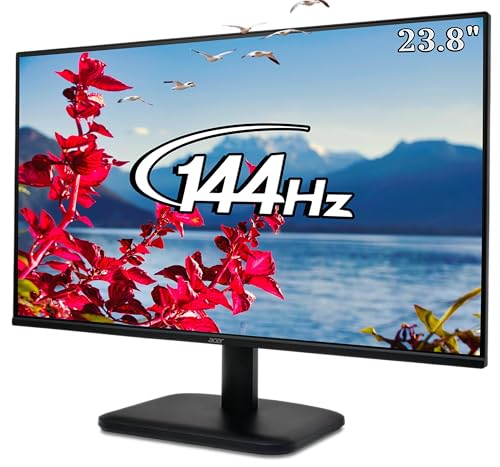
The EK240Y P6 is the cheapest way onto this list and, when we checked in August 2026, the number one bestseller in Amazon India's Monitors category. Neither of those facts would matter if the panel were poor, and it is not.
You get a 23.8-inch IPS panel at 1920×1080 with a 1500:1 contrast ratio and 99% sRGB coverage. Those are the same two numbers the Rs11,399 Dell posts. On a spec sheet the gap between the cheapest and the most expensive display here is much narrower than the price gap suggests.
What Acer cut to hit Rs6,999 is everything around the panel. There is one HDMI port and one VGA port, which in 2026 effectively means one usable input. There are no speakers. The stand tilts and does nothing else.
- 23.8-inch IPS, 1920×1080
- 144Hz refresh rate, 1ms VRB response
- 1500:1 contrast, 250 nits, 99% sRGB
- 1x HDMI, 1x VGA, no DisplayPort
- Tilt only, minus 5 to 20 degrees
- Three-year manufacturer warranty, Energy Star certified
Pros: The cheapest entry to a 144Hz IPS panel in this band. Contrast and colour coverage that match displays costing Rs4,000 more. Acer's VisionCare set covers BlueLightShield, flicker-less operation and a matte ComfyView finish.
Cons: No built-in speakers at all. One HDMI and one VGA means you cannot leave two machines plugged in. Tilt-only stand with no height adjustment, which is the single thing you will feel by the end of a long day.
- 【Vibrant Colors】Experience immaculate Picture quality with IPS Full HD Resolution I Frameless Design I 178 degree wide v…
- 【144Hz Refresh】Rapid 144Hz refresh rate, it means that even when the action heats up, your gameplay will be smooth and l…
- 【AMD FreeSync】Enabling smooth gameplay, Eliminating screen tearing, Minimizing lag and latency I With FreeSync, the moni…
4. Samsung LS24D300GAWXXL
This is the pick for the buyer who wants a display from a brand with a service centre in their city and does not want to think about it again for five years. Samsung's India network is the widest of the five brands here, and the warranty runs three years.
The panel is a 24-inch IPS at 1080p with a 100Hz refresh rate. At 2.4kg it is the lightest monitor on this list, less than half the weight of the 5kg BenQ. Wall-mount it on a light bracket, or move it between rooms without planning the trip.
The catch is colour. Samsung quotes 72% NTSC coverage, and the Acer, BenQ and Dell all quote 99% sRGB. Those are different scales, but they are not close: 72% NTSC is roughly the older, narrower standard that budget panels have used for years. Contrast is 1000:1, the lowest of the five. For spreadsheets and email this is invisible. For anything where colour matters, it is the weakest panel here.
- 24-inch IPS, 1920×1080
- 100Hz refresh rate, 5ms GtG
- 1000:1 contrast, 250 nits, 72% NTSC colour gamut
- 1x HDMI 1.4, 1x D-Sub
- Tilt minus 2 to 21 degrees
- 2.4kg, three-year manufacturer warranty
Pros: Lightest panel in the roundup by a clear margin. Eye Saver Mode and reduced flicker for long sessions. The best after-sales reach of any brand here, which matters more in a smaller city than any spec on this page.
Cons: The narrowest colour coverage of the five. Lowest contrast ratio at 1000:1. No speakers, no height adjustment, and one HDMI port.

- Samsung 24 Inch Flat IPS Display Monitor FHD 1,920 x 1,080 Resolution
- Aspect Ratio: 16:09 | 178°(H)/178°(V) Viewing Angle | 16.7 Million Color Support | 250 cd/㎡ Brightness (Typical) | 1,000…
- IPS Panel | 100Hz Refresh Rate | Game Mode | Eye Saver Mode & Less Screen Flickering | Super Slim Design
3. BenQ GW2490
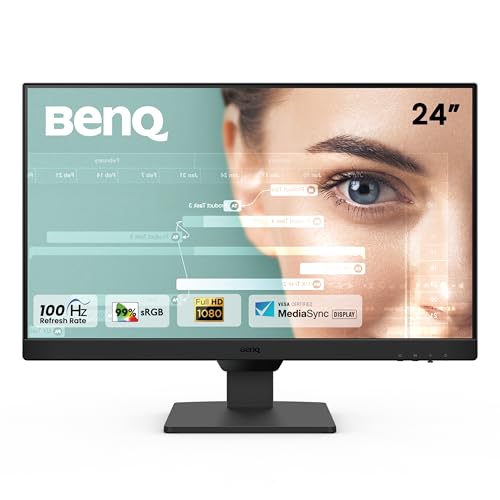
The GW2490 has 2,308 ratings at 4.4 stars, which is more than the other four displays on this list put together. That depth of feedback is worth something on its own, because it means the failure modes are known rather than guessed at.
It is also the best-connected display under Rs10,000 here. Two HDMI ports plus a DisplayPort means a work laptop and a personal desktop can both stay plugged in, and a front hotkey switches between them. If you have ever crawled behind a desk to swap a cable, that one feature justifies the price step over the Samsung.
BenQ's eye-comfort work is real rather than marketing. Brightness Intelligence reads ambient light and adjusts the panel to match. Coding Mode and ePaper Mode are preset colour profiles aimed specifically at reading text for hours.
- 23.8-inch IPS, 1920×1080
- 100Hz refresh rate, 5ms response
- 1300:1 contrast, 250 nits, 99% sRGB
- 2x HDMI plus DisplayPort
- 2W x2 built-in speakers
- Brightness Intelligence, Low Blue Light Plus, Flicker-Free
- Three-year manufacturer warranty
Pros: By far the deepest review pool in this roundup at 4.4 stars. Three video inputs with hotkey switching. Text-reading modes that do something specific rather than a generic blue light toggle.
Cons: The built-in speakers are the most consistent complaint across its reviews, described repeatedly as too quiet to use. Tilt-only stand. It needs a 16A socket, which is worth checking before the box arrives.
- [Display]: 23.8 inch 1300:1 CR, IPS Panel, LED Backlit, Full HD 100Hz Monitor, 99% sRGB for vibrant colors, Ultra-Slim B…
- [100Hz Refresh Rate]: Enjoy smooth and fluid visuals with our monitor’s lightning-fast 100Hz refresh rate, reducing lag …
- [Professional 99% sRGB Color Gamut]: Experience vivid and lifelike colors with our monitor’s 99% sRGB color gamut, ensur…
2. LG 24U631A
This is the only display here that is not 1080p, and for some readers that single fact settles the decision. At 2560×1440 across 23.8 inches, the 24U631A gives roughly 78% more desktop area than every other monitor on this list. Two documents fit side by side properly. A code editor and a browser stop fighting each other.
It is also the only panel under Rs15,000 in this comparison with USB-C. One cable carries video and 15W of charge, so a laptop docks and undocks with a single connector. For a hybrid worker who moves a machine between desk and sofa daily, that is one less thing to do twice a day.
Two things keep it at number two. The stand tilts and nothing more, and it sits low: multiple buyers recommend budgeting for a separate monitor arm on top of the purchase. And there are no speakers whatsoever, so external audio is not optional.
- 23.8-inch IPS, 2560×1440 QHD
- 100Hz refresh rate, 5ms GtG
- 1000:1 contrast, 250 nits, 99% sRGB, HDR10
- 1x HDMI, 1x USB-C with 15W power delivery
- Tilt-adjustable stand only
- 3.6kg, three years parts and labour
Pros: The only QHD panel in this price band here, and the extra working area is the largest single productivity gain on this page. USB-C single-cable docking. sRGB coverage and HDR10 support at a mainstream price.
Cons: No speakers at all. A short, tilt-only stand that several buyers say needs replacing with an arm. No USB-C cable in the box, and 15W will not keep a power-hungry laptop charged on its own.

- 24-Inch QHD IPS Display: Enjoy stunning detail with a 2560×1440 resolution and IPS technology for consistent colors and …
- 100Hz Refresh Rate & 5ms Response Time: Experience smoother visuals with a 100Hz refresh rate and responsive 5ms (GtG) f…
- sRGB 99% Color Accuracy With HDR10 : Achieve accurate color reproduction with sRGB 99% (CIE1931), delivering vibrant ima…
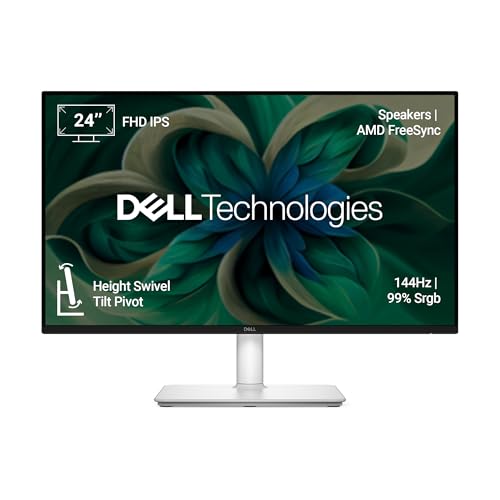
1. Dell S2425HSM
The S2425HSM wins because it is the only display in this roundup that moves. The stand offers 110mm of height travel, 30 degrees of swivel in each direction, 90 degrees of pivot in each direction, and tilt from minus 5 to plus 21. Every other monitor here tilts and stops.
That sounds like a minor spec until you place it against how a screen is supposed to sit. Getting the top of the panel to eye level on a tilt-only stand means stacking it on books. On the Dell you turn a knob.
The panel backs it up. At 300 nits it is the brightest here, its 1500:1 contrast ties for best, and it covers 99% sRGB at 144Hz. The dual 3W speakers are the only ones in this comparison that buyers describe as usable for calls rather than as a box to tick. It carries TUV four-star eye comfort certification and a three-year warranty.
At Rs11,399 it also happens to undercut the LG. We are ranking on fit rather than price, and it is a coincidence, but a welcome one.
- 23.8-inch IPS, 1920×1080
- 144Hz refresh rate, 1ms MPRT
- 1500:1 contrast, 300 nits, 99% sRGB
- 2x HDMI
- Dual 3W speakers with five sound presets
- Height 110mm, tilt, swivel 30 degrees, pivot 90 degrees
- TUV four-star eye comfort certified, three-year warranty
Pros: A full ergonomic stand that no other display in this roundup offers at any price in the band. The brightest panel here at 300 nits with joint-best contrast. Speakers that are actually adequate for meetings.
Cons: Still 1080p, so the LG buys more working space for roughly the same money. Two HDMI ports and nothing else, meaning no DisplayPort and no USB-C. Like every panel here, it is an LCD with LED backlighting despite the listing language.
- Elevated Entertainment: Enjoy your favourite shows with smooth visuals and built-in speakers. The FHD resolution and 150…
- Hear The Audio Difference: Immerse yourself in sound with integrated dual 3W speakers delivering a wider range of freque…
- Eye Comfort: Prioritise visual comfort with this 4-star TÜV-certified display. Reduce harmful blue light emissions while…
What to Look for in the Best Monitor Under 15000
Most buying advice in this category leads with resolution and refresh rate. Those matter, but they are not where the regret usually comes from.
Stand adjustment is the spec people underrate. OSHA's guidance for computer workstations is specific: put the monitor at least 20 inches away, and place it so the top line of the screen is at or below eye level, with the centre of the screen 15 to 20 degrees below horizontal. Their monitor placement guidance is worth two minutes before you buy anything. A tilt-only stand cannot reach that position on most desks, which is why height adjustment is the one feature worth paying a premium for.
Panel type is effectively settled. Every display here is IPS, and at this price you should not accept a TN or VA panel for office work. IPS gives you 178-degree viewing angles and consistent colour, which matters the moment somebody leans over to look at your screen.
Count the ports you will actually use. One HDMI is enough for exactly one machine. If you have a work laptop and a personal one, two inputs saves you a daily annoyance. USB-C is the upgrade worth chasing if your laptop supports it, but check the power delivery figure: 15W keeps a phone topped up, not a laptop running.
Resolution is a genuine fork in the road. At 24 inches, 1080p is sharp enough and everything works at 100% scaling. QHD gives you meaningfully more room but text gets small, and you may end up scaling to 125%, which claws back part of the gain. If you mostly write and read, 1080p on a better stand beats QHD on a worse one.
Check the warranty and the service network, not just the number. All five here quote three years. What differs is how easy a claim is in your city, and that is where Samsung and Dell have an advantage over the others.
Also see our picks for the best WhatsApp automation tools in India.
Frequently Asked Questions
Is a 24-inch monitor big enough for working from home?
For most desks, yes. At a normal 50 to 70cm viewing distance, 24 inches fills your field of view without forcing you to turn your head. A 27-inch panel is more comfortable only if you sit further back, and at this price the 27-inch options are noticeably worse panels.
Should I get 1080p or QHD?
Choose QHD if you regularly work with two windows side by side or edit anything visual. Choose 1080p if you mostly use one application at a time, because the money saved buys a better stand and better ports. The best 24 inch monitor under 15000 for you depends entirely on which of those describes your day.
Do I need 144Hz for office work?
No. The difference between 60Hz and 100Hz is visible when scrolling and pleasant to have, but the jump from 100Hz to 144Hz makes no practical difference to spreadsheets or documents. Do not pay extra for it unless you also game.
Are built-in monitor speakers good enough for video calls?
Usually not. Of the five here, only the Dell's dual 3W speakers get consistently positive comments. Budget for a separate headset if calls are a daily thing.
What is the difference between a work monitor and a gaming monitor at this price?
Both use similar panels. A gaming model spends its budget on refresh rate and response time, while the best monitor for office work spends it on stand adjustment, port selection and colour accuracy. Under Rs15,000 you cannot have both, so pick the one matching how you spend most of your hours.
What makes the best monitor for work from home different from a general-purpose one?
Three things, in order: a stand that reaches the right height, enough inputs to keep a work machine and a personal one connected, and a matte finish that does not throw window glare back at you. Resolution and refresh rate come after all three. A cheap panel at the right height beats an expensive one at the wrong height, every day of the week.
Can I wall-mount these?
All five support VESA mounting. The Samsung at 2.4kg and the Acer at 2.73kg are the easiest to mount on a light bracket. Mounting the Dell means giving up the adjustable stand that makes it our top pick, so think twice about that one.
Does a monitor reduce eye strain compared with a laptop screen?
It can, mostly because you can position it correctly and because a matte 24-inch panel at arm's length beats a glossy 14-inch one on your lap. The eye-care features here help at the margin, but placement does more work than any setting.
Final Verdict
The Dell S2425HSM is the best monitor under 15000 for most people working from home. Nothing else in this band gives you a stand that adjusts for height, swivel and pivot, and that single feature does more for a long working day than any panel spec on this page. It is also the brightest display here, ties for best contrast, and has the only usable speakers.
The LG 24U631A is the pick if screen space is your bottleneck. The QHD panel and USB-C docking are real advantages, and if you already own a monitor arm, the stand complaint disappears and this becomes the better buy.
The Acer EK240Y P6 is the budget choice. At Rs6,999 it delivers the same contrast and colour coverage as displays costing far more, and the compromises are all in ports and stand rather than in the picture.
If you want the safest middle option, the BenQ GW2490 at Rs8,750 has the deepest review history of anything here and the best connectivity under Rs10,000.
Whichever you pick, spend twenty minutes setting the height and distance properly afterwards. It costs nothing and it is the part that actually saves your neck.
- Elevated Entertainment: Enjoy your favourite shows with smooth visuals and built-in speakers. The FHD resolution and 150…
- Hear The Audio Difference: Immerse yourself in sound with integrated dual 3W speakers delivering a wider range of freque…
- Eye Comfort: Prioritise visual comfort with this 4-star TÜV-certified display. Reduce harmful blue light emissions while…
This post contains affiliate links. If you buy through them, I may earn a commission at no extra cost to you.











2 thoughts on “Best Monitor Under 15000 in India: Top 5 Picks for 2026”